How LLM Tool Calling Works (Function Calling Explained)
Blog / How LLM Tool Calling Works (Function Calling Explained)
What actually is LLM tool calling? This post explains exactly that.
The Text-Only Problem
A large language model is just a text prediction engine. It can only produce text.On its own, it cannot look up live data like an order status or today's weather. It also cannot take an action in the outside world, like sending an email or updating a database record.Tool calling lets the model ask your application to do those things for it.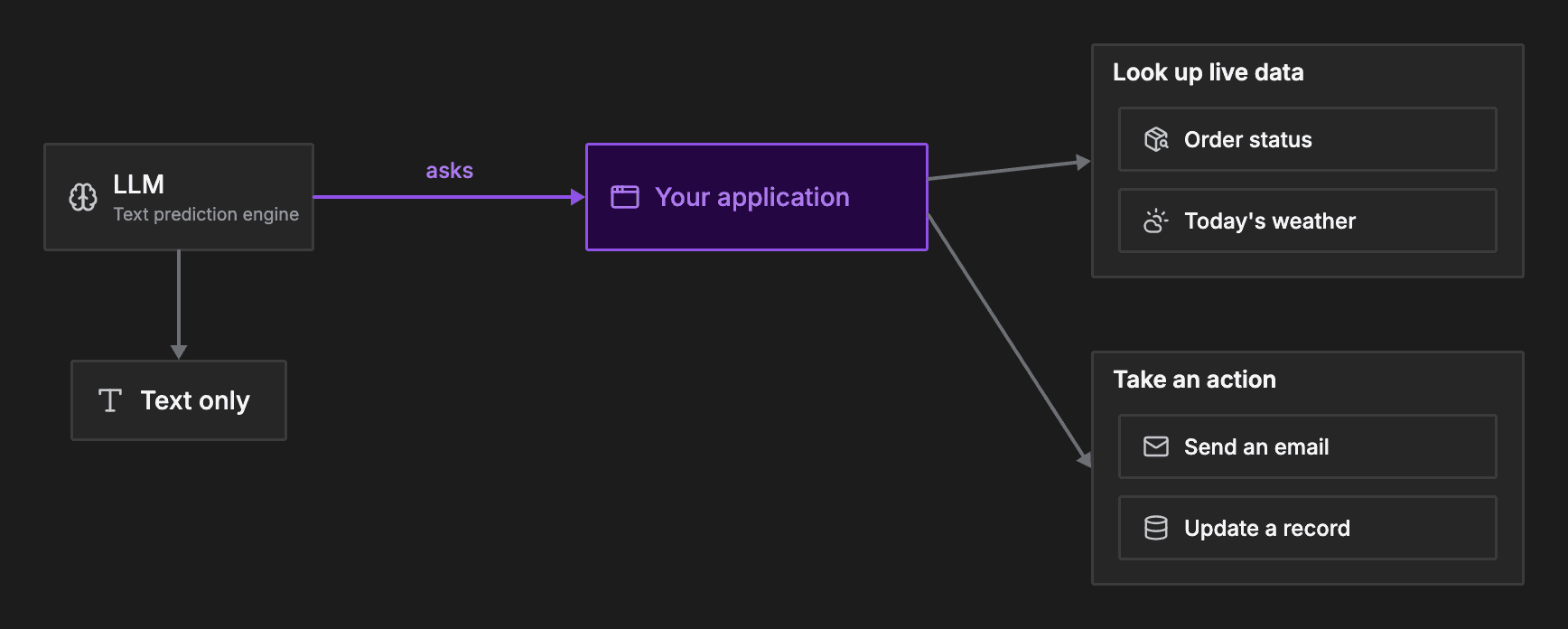
Defining a Tool
Your application sends tool definitions along with the user prompt. Each tool has a name and a description. The model reads the description to decide when to use the tool.It also has parameters that are rigorously described using JSON Schema.{
"name": "get_order_status",
"description": "Look up the current shipping status of an order.",
"parameters": {
"type": "object",
"properties": {
"order_id": { "type": "string" }
},
"required": ["order_id"]
}
}
The Tool Calling Flow
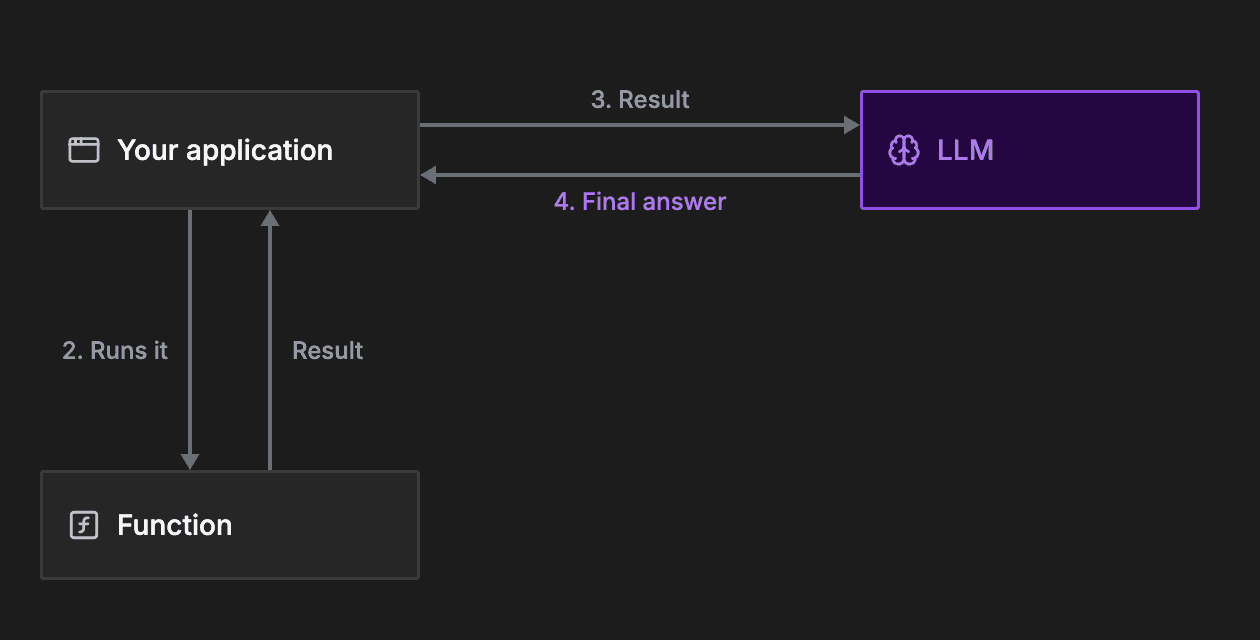
The process happens in four distinct steps.- Step 1: The model reads the prompt and the tools and, instead of answering, returns a tool call. This call is just the tool's name and its arguments formatted as JSON.
- Step 2: Your application parses the JSON and runs the function itself. The model never executes any code.
- Step 3: The application sends the function's result back to the model in a follow-up request.
- Step 4: The model reads the result and writes the final answer.
A Request End to End
Imagine a customer asking "Where is my order 1234?".The application sends this question and the get_order_status tool to the model. The model halts its text generation and returns a JSON call to get_order_status with the order_id set to 1234.Your application receives this, calls its orders database, and sends back a status like "Shipped". The model reads that status and finally answers the customer in plain language.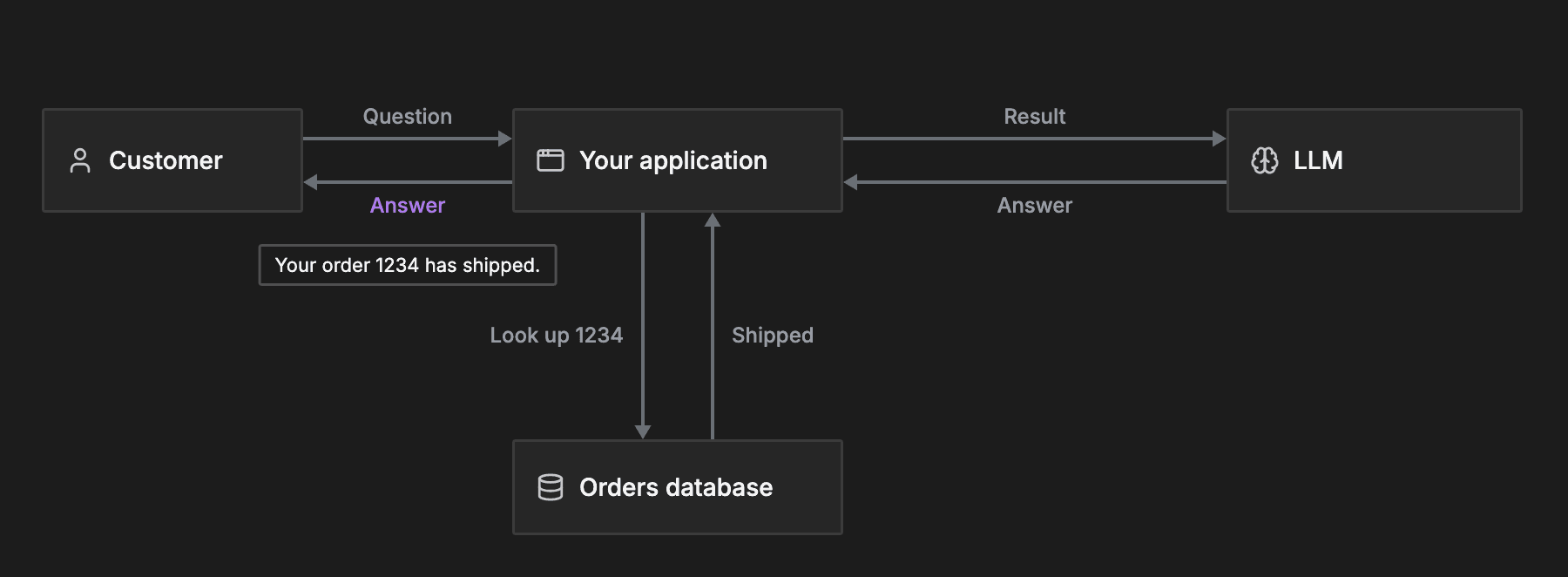
Tool Choice and Parallel Calls
Developers use a tool_choice parameter to control whether the model may call a tool.- You can set it to auto so the model decides if a tool is needed.
- You can set it to required so the model is forced to call at least one tool.
- You can pass a specific tool name to force the model to call that exact function.
- You can set it to none to disable tools and force a text-only response.
Failure Modes and Guardrails
Connecting a large language model to real code introduces new risks.- The model can pick the wrong tool or produce invalid or made-up arguments, so your application must validate all arguments against the schema.
- The model can get stuck repeatedly calling a tool in a loop, so developers must cap the number of execution steps.
- A tool result can carry a malicious prompt injection, so applications must treat all tool results as untrusted data.
- High-stakes actions are dangerous, so give each tool least-privilege access and ask a human to confirm risky actions before execution.
Where Agents and MCP Fit
An AI agent is fundamentally just a system utilizing tool calling in an iterative loop until a task is done.MCP, the Model Context Protocol, is a standard way to expose tools so that any compatible app can use them. To learn more, read What is MCP?.Recap
| Topic | Summary |
|---|---|
| The problem | Tool calling solves the text-only limitation by letting models request actions. |
| Tool definition | Tools are defined with a name, a description and parameters mapped out in JSON Schema. |
| The flow | The model returns a tool call, the application runs the code, the application returns the result, and the model answers. |
| Control | Developers control execution with tool choice settings and can process parallel calls simultaneously. |
| Safety | Failure modes require guardrails like schema validation, loop caps, untrusted data handling and human confirmation. |
| Ecosystem | Agents loop this mechanism to complete complex tasks, and MCP standardizes how tools are shared. |
About TechPrep
Never walk into a technical interview unprepared again. TechPrep empowers software engineers to stop guessing and start getting offers. We provide the exact questions asked by tech companies across Data Structures & Algorithms, System Design, Low-Level Design & AI coding rounds. Don't leave your career up to chance. Join thousands of engineers who have successfully navigated the tech hiring maze and landed roles at top tech companies.