What is MCP? Model Context Protocol Explained
Blog / What is MCP? Model Context Protocol Explained
What is MCP (Model Context Protocol)? And why is every AI tool suddenly adding support for it?
The M × N Integration Problem
Every AI application needs its own custom integration for every tool or data source it wants to use.An application might be a chat assistant, an IDE, or an autonomous agent. A tool or data source could be GitHub, a database, or Slack.If you have M apps and N tools, you end up with M × N separate integrations to build and maintain. This creates a massive duplication of engineering effort.One Protocol: M + N
So how can we solve this runaway integration problem? This is where MCP comes in.MCP is an open protocol that standardises how AI applications connect to tools and data. It was created by Anthropic and officially open-sourced on November 25, 2024.With MCP, each application implements the protocol once. Each tool also implements the protocol once.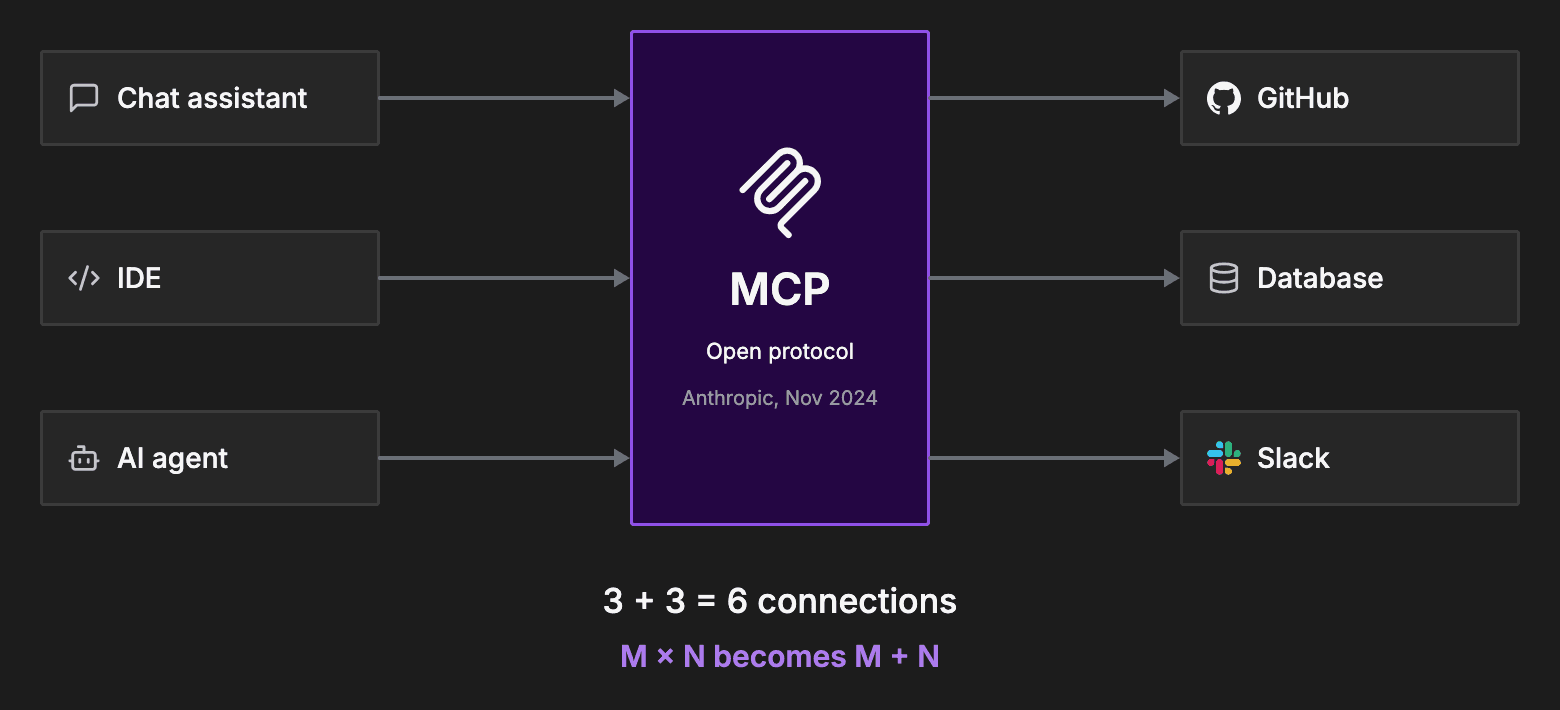
Host, Client and Server
The architecture relies on three distinct roles.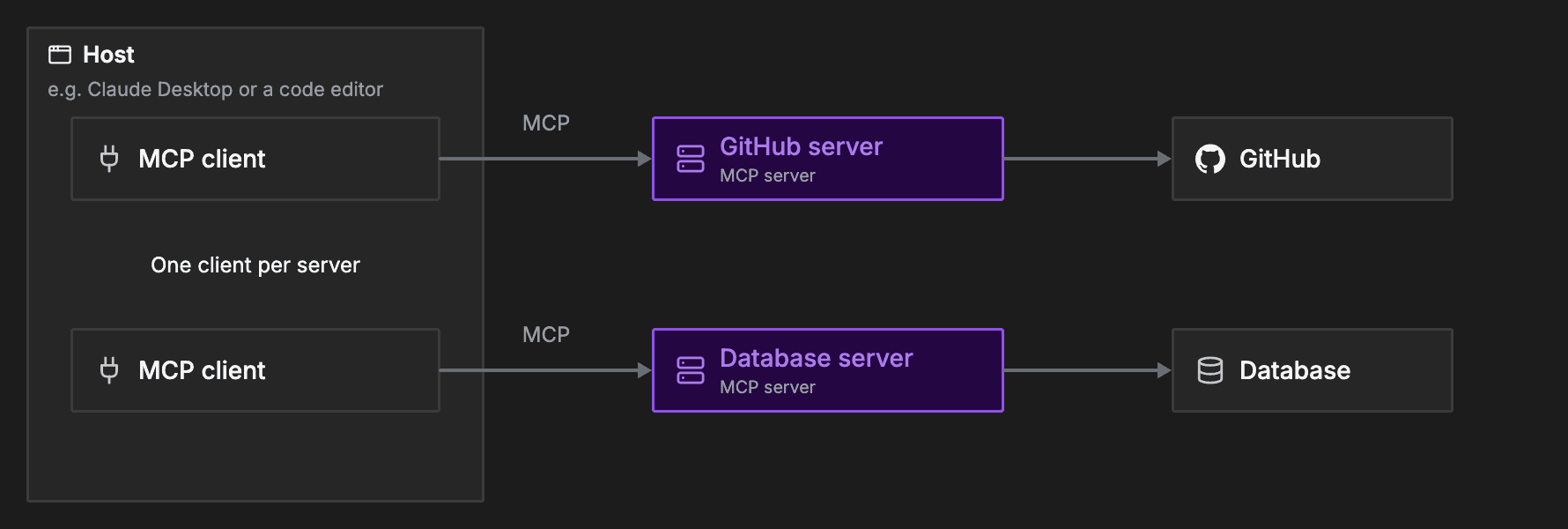
- The host is the user-facing AI application you are working in, like Claude Desktop or your code editor.
- The client is the protocol connector running invisibly inside the host. The host runs exactly one client per server it connects to.
- An MCP server is a program that connects to external systems. It exposes the capabilities of that external tool or data source via the protocol.
Tools, Resources and Prompts
An MCP server can expose three different types of capabilities.- Tools are executable functions the model can call. For example, a function that hits the GitHub API to create a new issue.
- Resources are read-only data the application can pull for context. One example is a local file URI pointing to an application log.
- Prompts are reusable instruction templates provided by the server. A concrete example is a slash command to generate a commit message.
A Request End to End
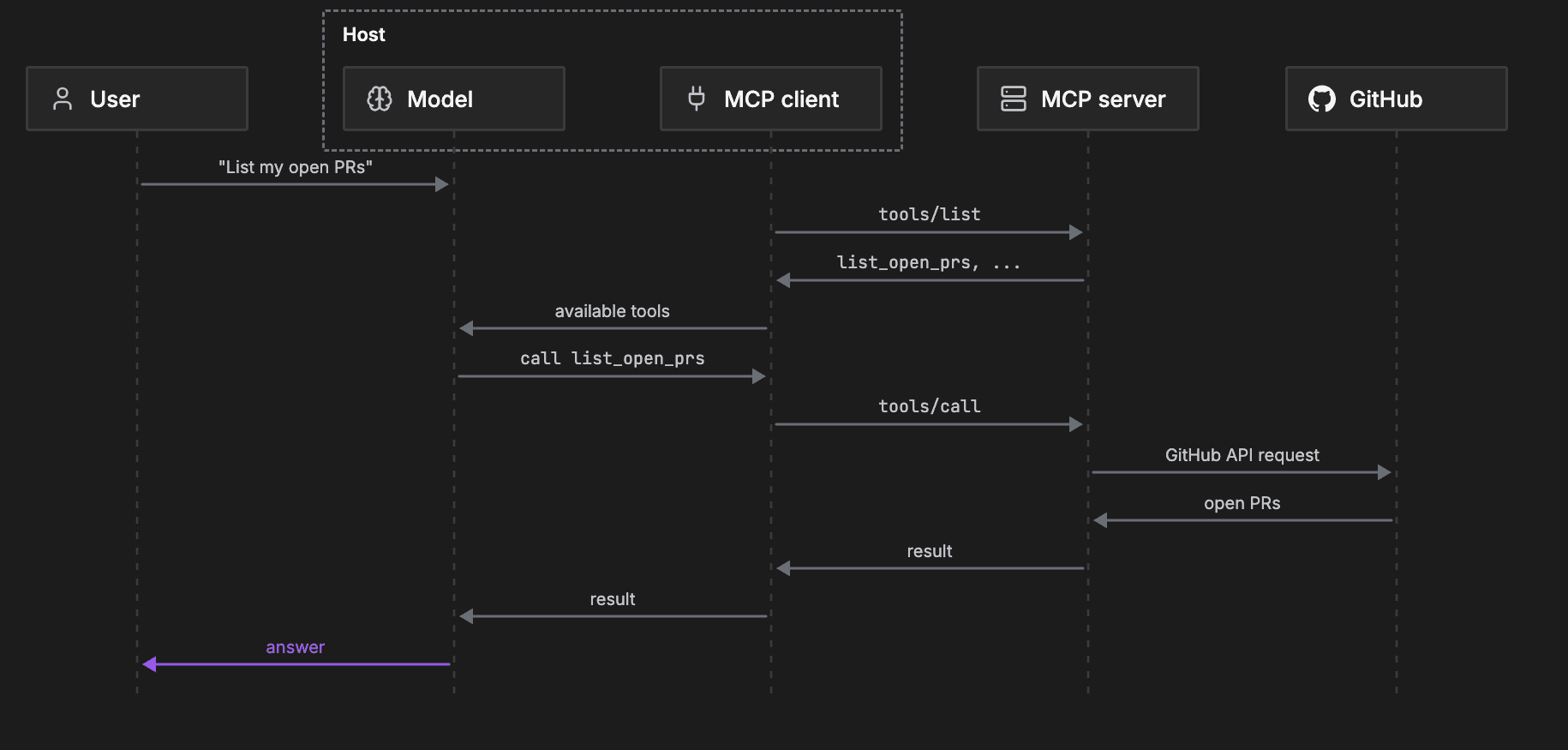
Let's walk through one request end to end. Imagine a user asking to "list my open pull requests" with a GitHub MCP server connected.- Step 1: the client asks the server for its available tools using a tools/list request.
- Step 2: the host passes these tools to the model, and the model decides to pick the pull request tool.
- Step 3: the client sends a tools/call request to the server, formatted in JSON-RPC 2.0.
- Step 4: the server executes the logic against GitHub and returns the payload.
- Step 5: the model reads the result to write the answer for the user.
from mcp.server import MCPServer
mcp = MCPServer("GitHubServer")
@mcp.tool()
def list_open_prs(repo: str) -> str:
return f"Fetching PRs for {repo}..."
MCP vs Tool Calling
MCP does not replace the native tool calling ability of large language models. The model still decides when and how to call a tool.MCP simply standardises how those tools are discovered and invoked. Because of this standard layer, the exact same server works with any app that supports MCP.Local vs Remote Servers
Servers can run in two different ways.Local servers run on your machine and communicate over standard input and output, known as stdio.Remote servers run elsewhere. They communicate over the network using Streamable HTTP. Remote connections are usually secured with OAuth for authorization.Security Risks
Connecting AI to external systems introduces security risks.Prompt injectionTool outputs can contain untrusted data that causes prompt injection. You should keep a human in the loop for sensitive actions to mitigate this.Too many permissionsA tool can also have broader permissions than it actually needs. You must apply least-privilege access and narrow your OAuth scopes.Untrusted serversInstalling a local MCP server means running third-party code you are trusting. Always vet the repository or run servers in isolated containers.Recap
| Term | Definition |
|---|---|
| M × N problem | The unsustainable need to build custom connectors for every app-to-tool pairing |
| Host | The AI application you are working in |
| Client | The protocol connector running inside the host |
| Server | The external program exposing the tool or data |
| Tools | Executable functions the model can call |
| Resources | Read-only data the application can pull for context |
| Prompts | Reusable instruction templates provided by the server |
| Transports | How the client and server send messages: stdio on your machine, Streamable HTTP over the network |
| Tool calling | The model's innate ability to pick and format arguments for a tool |
About TechPrep
Never walk into a technical interview unprepared again. TechPrep empowers software engineers to stop guessing and start getting offers. We provide the exact questions asked by tech companies across Data Structures & Algorithms, System Design, Low-Level Design & AI coding rounds. Don't leave your career up to chance. Join thousands of engineers who have successfully navigated the tech hiring maze and landed roles at top tech companies.