Promises vs Async/Await in JavaScript: What Is the Difference?
Blog / Promises vs Async/Await in JavaScript: What Is the Difference?
What actually is the difference between promises and async/await in JavaScript? And when should you use one versus the other?
The Callback Hell Problem
Imagine two functions that fetch data from a server. getUser looks up a user by their ID, and getOrders looks up that user's orders by the returned userId. Both take time, so we can't get the result straight away.There's no real server here, so we fake the network latency with setTimeout. Each function waits one second before replying, just like a real request over the network would. When the data is ready, it calls the callback it was given.Before promises existed, asynchronous JavaScript relied entirely on callbacks. You would pass a function to run after an async step finished. But if you had multiple steps that depended on each other, you had to pass a callback inside a callback.function getUser(userId, callback) {
setTimeout(() => {
callback({ id: userId, name: "Sam" })
}, 1000) // fake 1 second network latency
}
function getOrders(userId, callback) {
setTimeout(() => {
callback([{ id: 1, item: "Laptop" }])
}, 1000) // fake 1 second network latency
}
getUser(1, function(user) {
getOrders(user.id, function(orders) {
console.log(orders) // [{ id: 1, item: "Laptop" }]
})
})
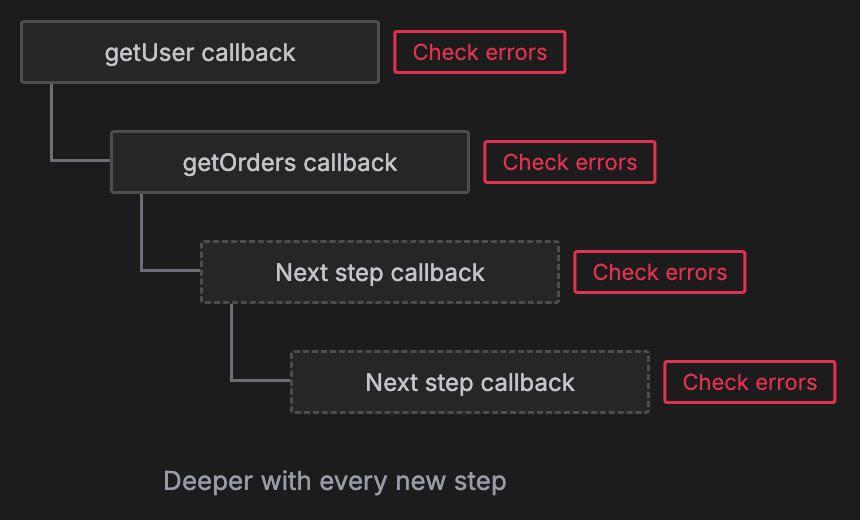
- Step 1: We call getUser(1) and pass it a callback. It starts a one second timer and returns straight away, so nothing is printed yet.
- Step 2: After one second, the timer fires and getUser calls our callback with the user, { id: 1, name: "Sam" }.
- Step 3: Inside that callback, we call getOrders(user.id) and pass it a second callback. This has to go inside the first callback, because it needs the user's ID. Another one second timer starts.
- Step 4: After another second, getOrders calls the inner callback with the user's orders.
- Step 5: Inside the inner callback, console.log prints [{ id: 1, item: "Laptop" }], about two seconds after we started.
How Promises Work
A promise is simply an object representing a value that is not ready yet.A promise can be in one of three states:- Pending
- Fulfilled
- Rejected
function getUser(userId) {
return new Promise(resolve => {
setTimeout(() => {
resolve({ id: userId, name: "Sam" })
}, 1000) // fake 1 second network latency
})
}
function getOrders(userId) {
return new Promise(resolve => {
setTimeout(() => {
resolve([{ id: 1, item: "Laptop" }])
}, 1000) // fake 1 second network latency
})
}
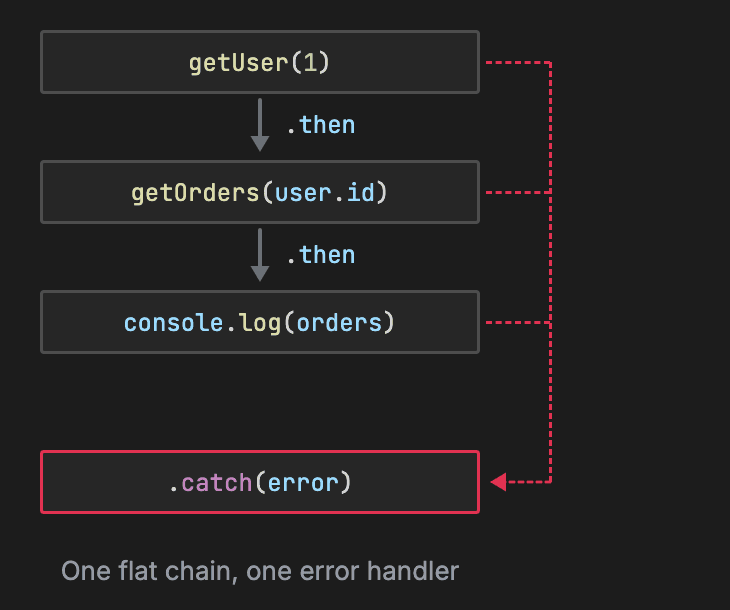
getUser(1)
.then(user => getOrders(user.id))
.then(orders => console.log(orders)) // [{ id: 1, item: "Laptop" }]
.catch(error => console.log(error))
How Async/Await Works
The JavaScript async and await keywords are built directly on top of promises. They are not a replacement for them. Every time you define an async function, it automatically returns a promise.Inside that function, the await keyword pauses execution until the promise settles. It only pauses the specific async function it is inside, without blocking the rest of the program. Errors are handled using a standard try and catch block.async function fetchOrders(userId) {
try {
const user = await getUser(userId)
const orders = await getOrders(user.id)
console.log(orders) // [{ id: 1, item: "Laptop" }]
} catch (error) {
console.log(error)
}
}
fetchOrders(1)
When to Use Promises
You should use raw promises for short, one-off async chains.They are also the right choice when you need to run independent tasks at the exact same time. You can pass multiple promises to Promise.all and run them concurrently.When to Use Async/Await
You should use async/await for step-by-step logic where each step needs the result of the previous one. It makes complex logic much easier to read.However, you have to be careful with independent tasks. If you await independent tasks one after another, they will run one at a time. This is much slower than using Promise.all.Predict the Output
Here's a common JavaScript interview question. Predict the exact output order of this short snippet.console.log("1. Start")
setTimeout(() => {
console.log("2. Timer")
}, 0)
Promise.resolve().then(() => {
console.log("3. Promise")
})
console.log("4. End")
- Synchronous code first: synchronous code always runs first, so Start and End print immediately.
- Then the microtask queue: the event loop checks the microtask queue, which holds promise callbacks. So Promise prints next.
- Then the macrotask queue: finally, the event loop checks the macrotask queue for timers, printing Timer last.

Recap
| Feature | Promises | Async/Await |
|---|---|---|
| Syntax | .then() chains | Reads top to bottom |
| Error handling | .catch() method | try/catch block |
| Best for | Concurrent tasks | Sequential tasks |
About TechPrep
Never walk into a technical interview unprepared again. TechPrep empowers software engineers to stop guessing and start getting offers. We provide the exact questions asked by tech companies across Data Structures & Algorithms, System Design, Low-Level Design & AI coding rounds. Don't leave your career up to chance. Join thousands of engineers who have successfully navigated the tech hiring maze and landed roles at top tech companies.