JWT Explained: What Is a JSON Web Token?
Blog / JWT Explained: What Is a JSON Web Token?
What actually is a JSON Web Token (JWT), and what is it used for?Before we can understand what a JWT is, we first have to understand the difference between authentication and authorization.
Authentication vs Authorization
- Authentication: proving who you are. For example, entering a username and password.
- Authorization: verifying what you are allowed to access. For example, checking if you have permission to view an admin dashboard.
What Is a JWT?
A JSON Web Token is an open standard (RFC 7519) for transmitting information securely between parties as a compact JSON object.It is predominantly used for authorization. Authentication happens only once, at login. Authorization happens continuously, on every subsequent request, to verify what you are allowed to access.Common applications of JWTs include:- Single Sign-On (SSO)
- Stateless REST and GraphQL APIs
- Microservice to microservice communication
The Structure of a JWT
A JWT consists of three distinct parts, separated by dots: header.payload.signaturePart 1: HeaderThe header is metadata. It specifies the token type and the hashing algorithm used:{
"alg": "HS256",
"typ": "JWT"
}
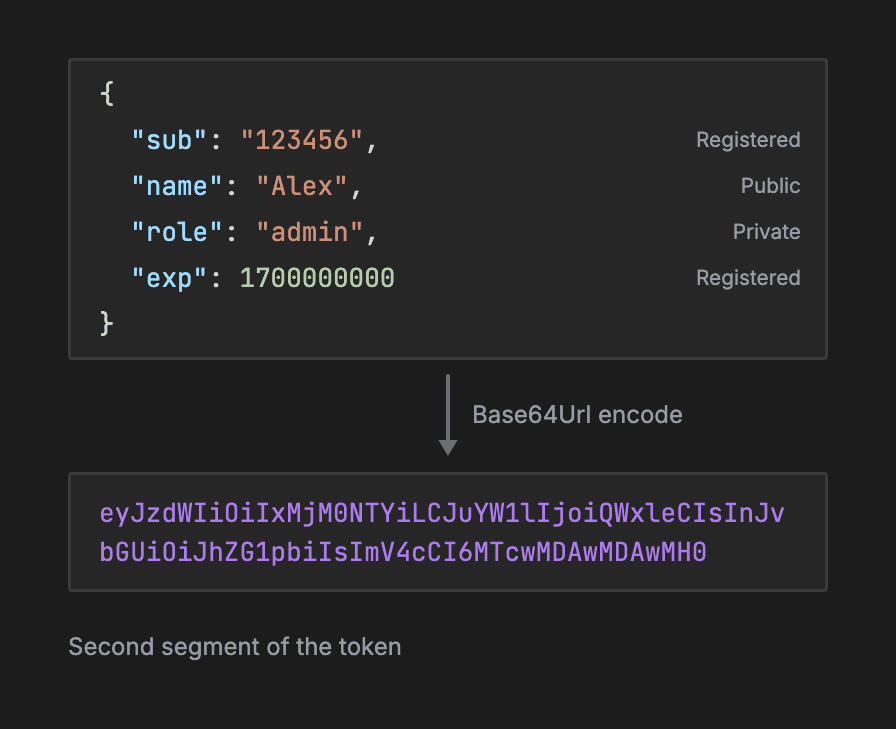
- Registered claims: a standardized, compact set of predefined metadata, such as expiration and issuer, that any JWT library can automatically parse and validate out of the box.
- Public claims: these let different systems and third-party services share custom data safely, by using collision-resistant namespaces or a public registry to prevent naming conflicts.
- Private claims: these let internal, cooperating systems exchange custom application data, such as user IDs and roles.
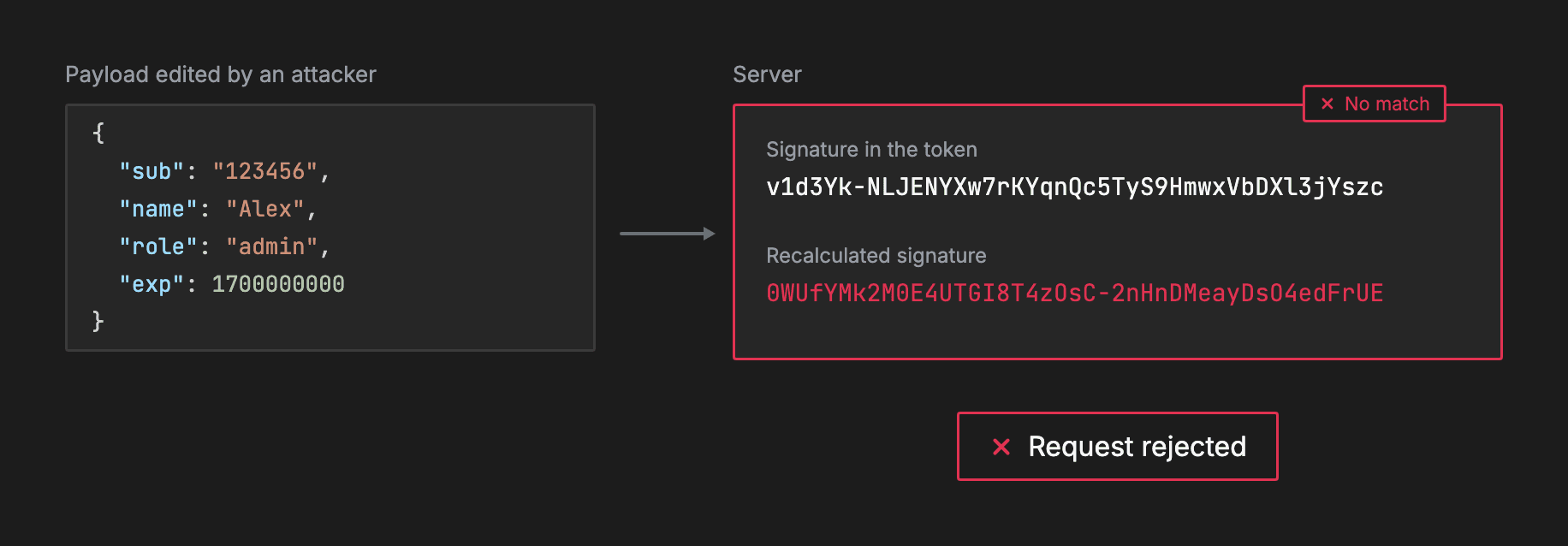
HMACSHA256(
base64UrlEncode(header) + "." + base64UrlEncode(payload),
server_secret
)
Example Flow
Here's how a JWT is used, from login to a protected request: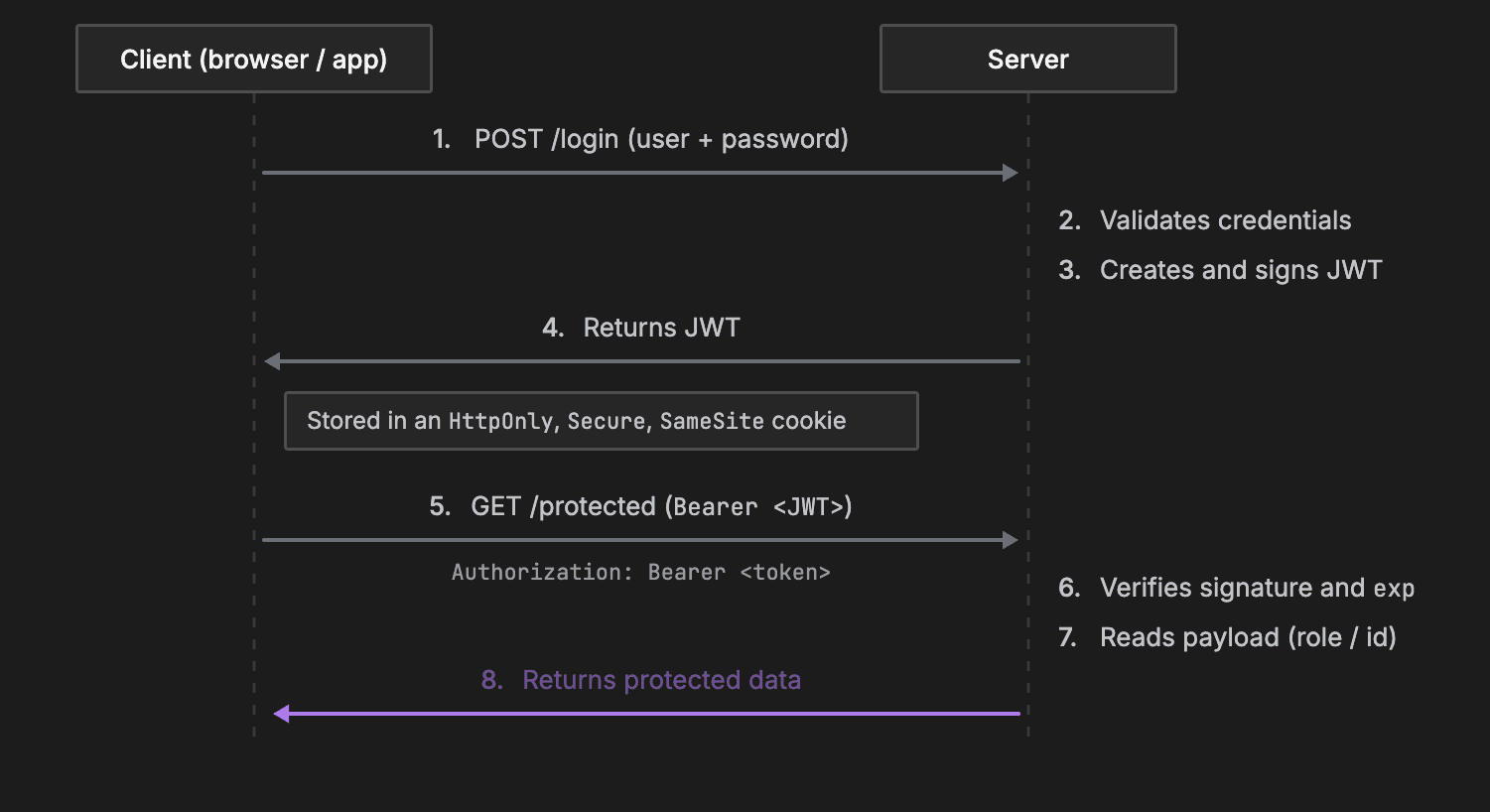
- Step 1: User login. The user sends their username and password via a POST request.
- Step 2: Token generation. The server validates the credentials. If they're valid, it constructs the payload, signs the JWT with its private secret and returns the token.
- Step 3: Client storage. The client stores the token, ideally inside an HttpOnly, Secure, SameSite cookie to mitigate cross-site scripting (XSS).
- Step 4: Subsequent requests. The client attaches the token in the HTTP Authorization header using the Bearer schema: Authorization: Bearer <token>.
- Step 5: Token verification. The server intercepts the request, verifies the signature with its secret key, checks that exp has not lapsed, and then grants or denies access.
Node.js Example
Here's the same flow in Node.js, with Express and the jsonwebtoken library:const express = require('express');
const jwt = require('jsonwebtoken');
const app = express();
app.use(express.json());
// Secret key stored only on the server (typically in process.env)
const JWT_SECRET = 'your-256-bit-secret-key';
// 1. LOGIN ROUTE (Authentication -> Issue Token)
app.post('/api/login', (req, res) => {
const { username, password } = req.body;
// Mock credential verification
if (username === 'alex' && password === 'secret123') {
const userPayload = { userId: 42, username: 'alex', role: 'admin' };
// Sign payload; set expiration to 1 hour
const token = jwt.sign(userPayload, JWT_SECRET, { expiresIn: '1h' });
return res.json({ token });
}
return res.status(401).json({ error: 'Invalid credentials' });
});
// 2. VERIFICATION MIDDLEWARE (Authorization)
function verifyToken(req, res, next) {
const authHeader = req.headers['authorization'];
const token = authHeader && authHeader.split(' ')[1]; // Extract "Bearer <token>"
if (!token) return res.status(401).json({ error: 'Access token missing' });
jwt.verify(token, JWT_SECRET, (err, decodedPayload) => {
if (err) return res.status(403).json({ error: 'Token invalid or expired' });
req.user = decodedPayload; // Attach payload to the request object
next();
});
}
// 3. PROTECTED ROUTE
app.get('/api/dashboard', verifyToken, (req, res) => {
res.json({
message: `Access granted for user: ${req.user.username}`,
role: req.user.role
});
});
app.listen(3000, () => console.log('Server running on port 3000'));
- The secret: in a real app this is stored securely, not in the code. It's only here for the example.
- Login route: it creates a user payload, then uses the payload and the secret to create the token, with a one-hour expiry. It returns the token, or 401 Unauthorized for bad credentials.
- Verify middleware: every protected route goes through verifyToken first. It reads the Authorization header and splits it to get the second part, the JWT. It returns 401 if the token is missing, and 403 Forbidden if it's invalid or expired.
- Protected route: otherwise, next() moves on to the protected route, which returns a response to the user.
Advantages of JWT
- Stateless and scalable: the server does not keep session records in RAM or in a centralized session store like Redis. Any server instance with the secret key can validate the token.
- Microservices and SSO ready: a centralized identity service can issue a token, and multiple separate services can independently verify it, using a shared secret or a public/private key pair (RS256).
- Compact and self-contained: the user's ID and permissions sit directly inside the payload, so there's no need to hit a database on every API request.
- Mobile and cross-platform friendly: it doesn't rely on browser-specific cookie behavior, so it's easily passed across native iOS and Android clients, desktop apps and web apps.
Disadvantages of JWT
- Difficult revocation: because JWTs are stateless, you can't easily revoke a token before it expires, for example if a user logs out, changes their password or is banned. A server-side denylist can do it, but that negates statelessness.
- The payload is visible: the payload is unencrypted, so storing sensitive data in it creates security vulnerabilities.
- Larger network overhead: a JWT can be hundreds of bytes long, much larger than a standard 32-character session ID. Sending it in headers on every HTTP call increases bandwidth.
- Storage vulnerabilities: storing tokens in localStorage makes them susceptible to cross-site scripting (XSS). Storing them in regular cookies without the HttpOnly and SameSite flags exposes them to cross-site request forgery (CSRF).
Recap
| In short | |
|---|---|
| What it is | A compact, open-standard credential used to securely transmit verifiable identity and permission data between a client and a server |
| Structure | Three dot-separated parts: a header defining the algorithm, a readable payload containing user claims and expiration, and a cryptographic signature that prevents tampering |
| Core use case | Stateless authorization in modern APIs, SSO and microservices, so servers can verify permissions instantly without querying a session database |
About TechPrep
Never walk into a technical interview unprepared again. TechPrep empowers software engineers to stop guessing and start getting offers. We provide the exact questions asked by tech companies across Data Structures & Algorithms, System Design, Low-Level Design & Practical coding rounds. Don't leave your career up to chance. Join thousands of engineers who have successfully navigated the tech hiring maze and landed roles at top tech companies.