The JavaScript Event Loop Explained
Blog / The JavaScript Event Loop Explained
How exactly does JavaScript run asynchronous code like timers and promises if it can only do one thing at a time? And what order does that code actually run in?
The Single-Threaded Problem
JavaScript runs on a single main thread, so it can only run one piece of code at a time.If it had to wait for a timer or a network request, everything else would freeze.The event loop is how it avoids this waiting. But before we look at how the event loop works, we need to see how JavaScript tracks its current work.The Call Stack
The call stack is a list JavaScript keeps of the functions it is in the middle of running.They are stacked one on top of another, so the last one added is the first one to finish. A function call is pushed onto the top of the stack. When that function returns, it is popped off.Let's look at an example with two small functions. addTax takes a price and adds 20% tax to it. calculateTotal takes a price and uses addTax to work out the total.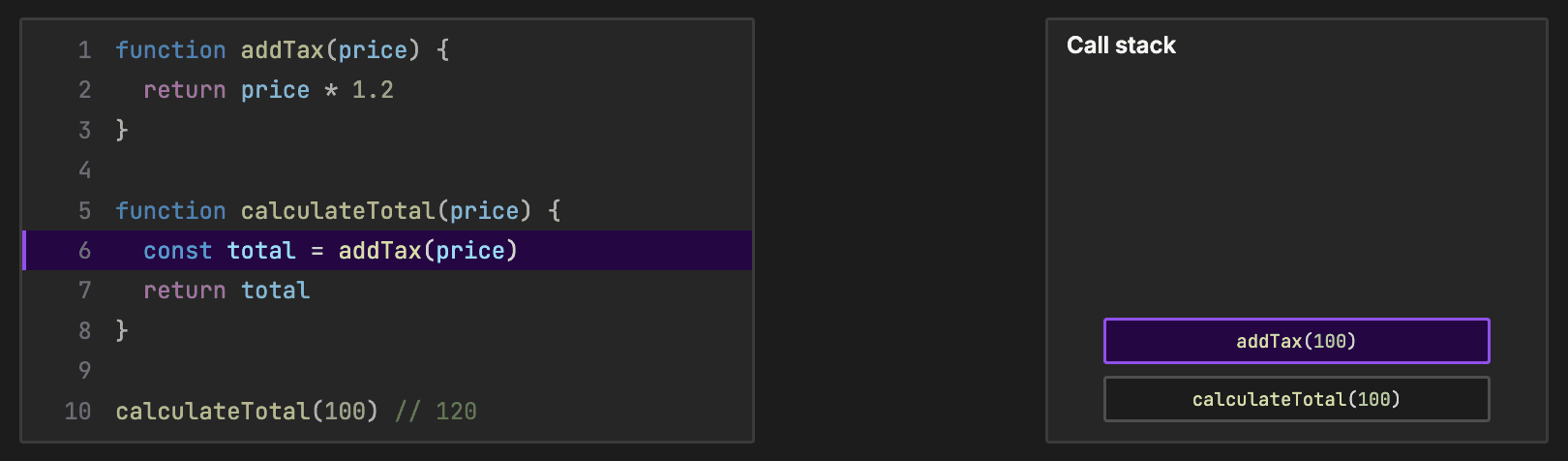
Web APIs
Slow work like setTimeout and fetch is handed off to the browser, or Node's runtime. The browser does the waiting outside the main thread.setTimeout(() => {
console.log("Done")
}, 1000)
Microtasks vs Macrotasks
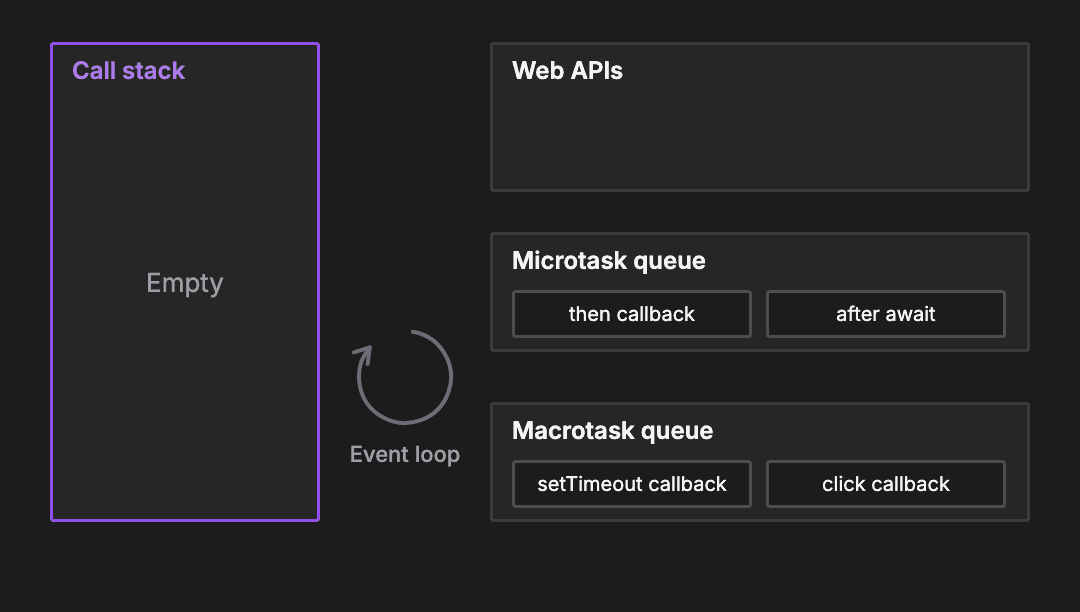
JavaScript sorts background work into two queues.The microtask queue holds promise callbacks. This includes .then methods and the code written after an await statement.The macrotask queue holds callbacks for older browser features like setTimeout.The event loop follows a strict rule:- It only takes work when the call stack is completely empty.
- When the stack is empty, it runs every callback in the microtask queue.
- Only then will it run exactly one callback from the macrotask queue.
- Then it repeats the process.
Blocking the Main Thread
Because callbacks only run when the call stack is completely empty, a long synchronous loop keeps everything waiting.setTimeout(() => console.log("Timer"), 0)
// a long synchronous loop: 1e9 is 1 billion
for (let i = 0; i < 1e9; i++) {}
console.log("Loop done")
- Split the work into smaller chunks. Run one chunk, then schedule the next with setTimeout. Between chunks the call stack is empty, so the event loop can handle clicks and other callbacks.
- Move heavy work to a Web Worker. A worker runs JavaScript on a separate thread, so the main thread stays free. In Node, the equivalent is worker threads.
Code Walkthrough: Predict the Output
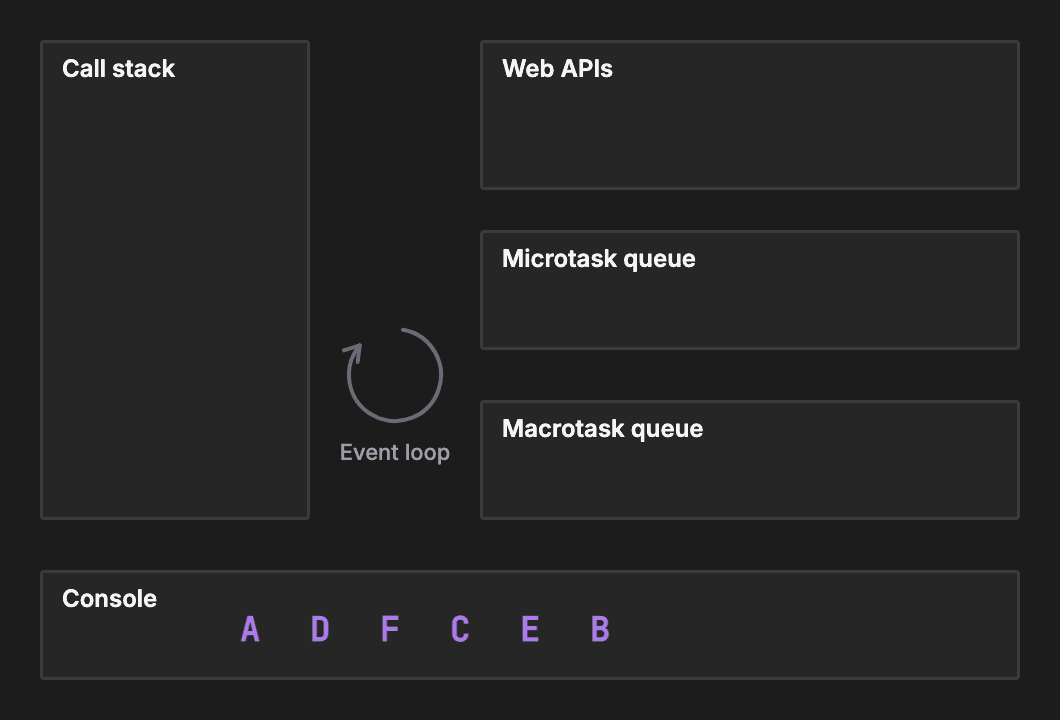
Take a look at this snippet. Can you predict the exact order these letters will be logged?console.log("A")
setTimeout(() => console.log("B"), 0)
Promise.resolve().then(() => console.log("C"))
async function run() {
console.log("D")
await null
console.log("E")
}
run()
console.log("F")
- Step 1: console.log is pushed onto the call stack, prints A, and pops off.
- Step 2: setTimeout is called. The browser starts a timer and places the callback for B into the macrotask queue.
- Step 3: Promise.resolve creates an instantly successful promise. Its .then callback for C is placed into the microtask queue.
- Step 4: We call the run function. The code before the first await runs straight away, so it prints D.
- Step 5: The await null statement pauses the rest of the function. The code after it, which logs E, is queued as a microtask.
- Step 6: Finally, we print F.
Recap
| Concept | Key rule |
|---|---|
| Call stack | Handles synchronous code one step at a time |
| Event loop | Only moves a callback onto the call stack when the stack is empty |
| Microtasks | All microtasks run before the next macrotask |
| setTimeout delay | A minimum time to wait, not a guaranteed exact time |
About TechPrep
Never walk into a technical interview unprepared again. TechPrep empowers software engineers to stop guessing and start getting offers. We provide the exact questions asked by tech companies across Data Structures & Algorithms, System Design, Low-Level Design & AI coding rounds. Don't leave your career up to chance. Join thousands of engineers who have successfully navigated the tech hiring maze and landed roles at top tech companies.