HTTP vs HTTPS: What Is the Difference?
Blog / HTTP vs HTTPS: What Is the Difference?
What is the actual difference between HTTP and HTTPS? And what does that padlock in the address bar really protect you from?
Anyone on the Path Can Read It
HTTP sends requests and responses as plain text. By default, it connects on port 80. Every hop between the browser and the server can read the network traffic.This includes public Wi-Fi, your ISP, and any router on the way. These middle hops can read your passwords or session cookies. They can also change the response before it arrives.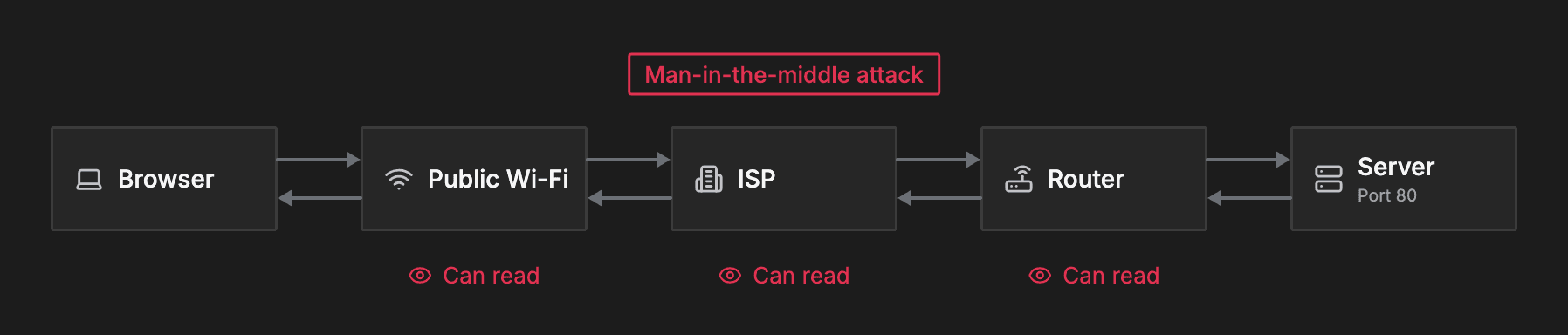
POST /login HTTP/1.1
Host: example.com
Content-Type: application/x-www-form-urlencoded
Content-Length: 27
username=alice&password=123
What HTTPS Is
HTTPS is not a different protocol for the web page. It is the exact same HTTP messages sent inside an encrypted connection. By default, it uses port 443.That encrypted connection was first built with SSL, which stands for Secure Sockets Layer. SSL is now deprecated and was replaced by TLS, which stands for Transport Layer Security, the protocol that encrypts and authenticates data sent between two machines.TLS is what is used today, and a TLS connection provides three strict guarantees:- Confidentiality: no one on the path can read the data.
- Integrity: any change made in transit is instantly detected.
- Authentication: you are talking to the real server for that domain.
Certificates: Proving Who the Server Is
The server presents a file called a certificate for its domain. This certificate is signed by a recognized certificate authority.The certificate authority first checks that whoever is asking actually controls the domain, so its signature vouches that the certificate, and the public key inside it, really belong to that domain.The browser checks the signature chain up to a root certificate in its own trust store. It checks that the certificate has not expired. It also checks that the domain name on the certificate matches the domain in the URL.If any of these checks fail, the browser shows a full-page security warning. Free automated certificate authorities like Let's Encrypt made these certificates free and easy to get.The TLS 1.3 Handshake
So the browser can check who the server is. But how do the two sides agree on a key to encrypt everything, when anyone on the path can see the messages they send? That happens in the TLS handshake.The client sends a ClientHello message with the versions and ciphers it supports, plus its key share.The server replies with its own key share, its certificate, and a digital signature. This signature proves the server holds the private key that matches the certificate.Both sides then use the key shares to compute the exact same session keys. They do this without ever sending those session keys across the network. Modern TLS 1.3 completes this entire handshake in exactly one round trip.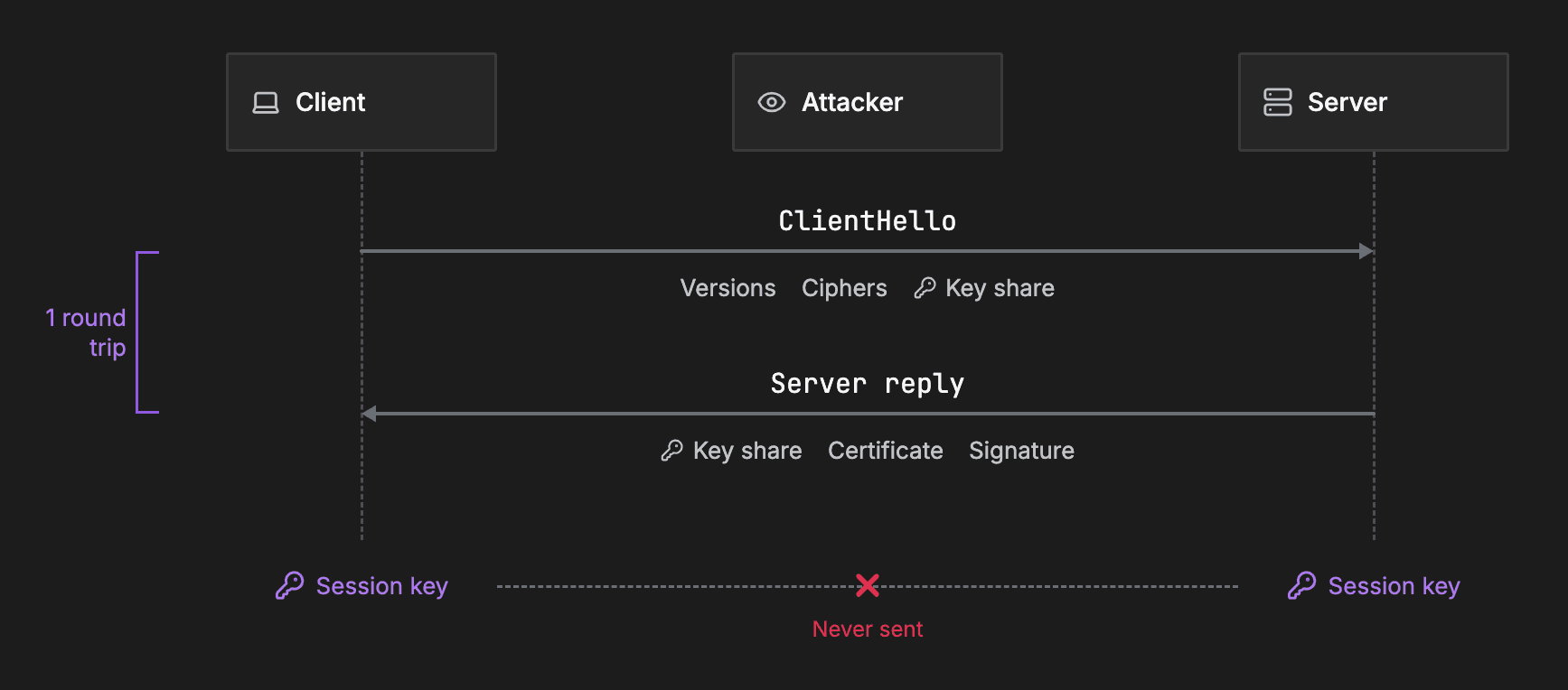
The First-Request Trap
This handshake secures the connection, but the very first visit is still vulnerable.Most people type a domain name without typing https. The browser's first request goes to port 80 in plain text, and the server sends a redirect to HTTPS.An attacker on the network path can intercept that first plain text request. They can prevent the redirect and keep the user on plain HTTP. This attack is called SSL stripping.The fix: HSTSThe fix is the Strict-Transport-Security header, or HSTS: Strict-Transport-Security: max-age=31536000; includeSubDomainsWhen a browser sees this header, it remembers to always use HTTPS for that domain. It completely skips the plain text request on all later visits.For absolute security, domains can join the HSTS preload list to protect even the very first visit.What the Padlock Doesn't Mean
Once all of this works, the browser shows a padlock in the address bar. So back to the question from the start: what does that padlock actually protect you from?A padlock in the address bar means the connection to that domain is encrypted and the certificate is valid. It does not mean the site is safe or honest. Phishing sites easily get valid certificates too.HTTPS also does not hide everything from the network. The destination IP address and the domain name are still visible. The domain leaks through your DNS queries and the SNI field in the ClientHello message.The rough size and timing of your network traffic are also visible to anyone watching. HTTPS only hides the specific URL path and the actual page contents.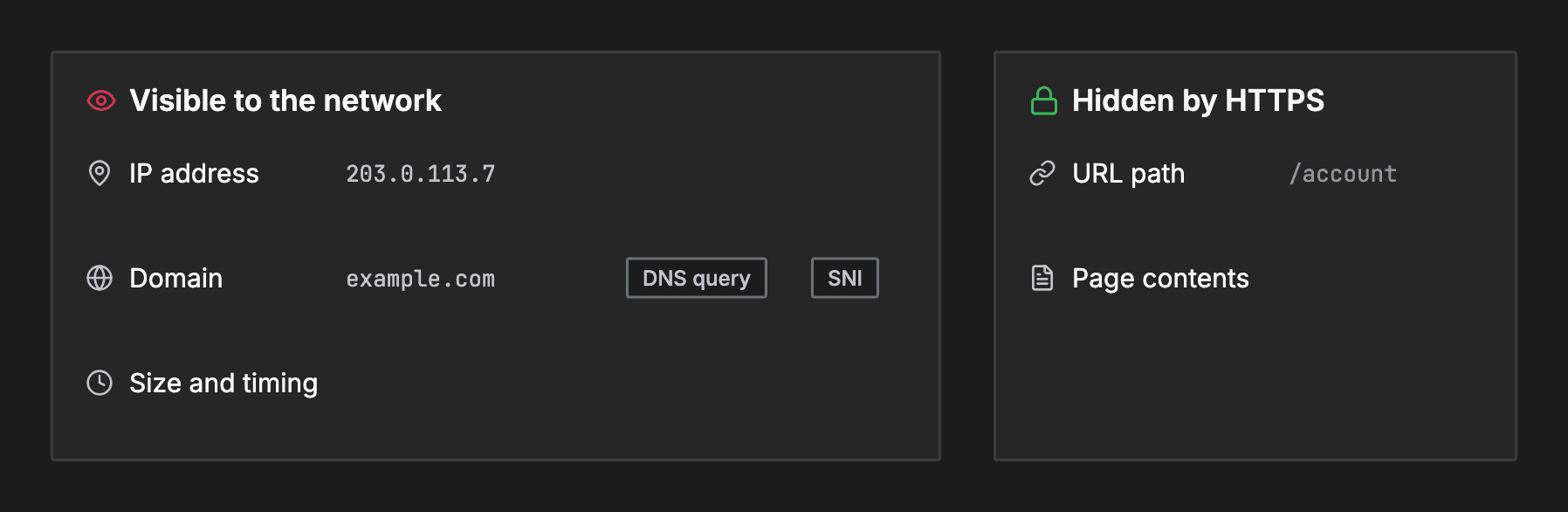
Where HTTPS Ends
In most production systems, the secure connection does not go all the way to the application code. TLS is usually terminated at a load balancer, an API gateway, or a CDN.This proxy decrypts the request and forwards it to the backend servers. Sometimes it re-encrypts the traffic for the internal network, but the public TLS session ends there.The "HTTPS is slow" mythWith TLS 1.3 and modern hardware, the computational cost is very small. More importantly, modern browsers only support HTTP/2 and HTTP/3 over TLS.Because these newer protocols reduce latency, HTTPS is often much faster in practice than plain text HTTP.Recap
| Feature | HTTP | HTTPS |
|---|---|---|
| What it is | Plain text web protocol | HTTP inside a TLS tunnel |
| Default port | Port 80 | Port 443 |
| Encryption | None | Encrypted in transit |
| Integrity | None | Tampering is detected |
| Server identity | Not verified | Verified by signature |
| Certificate needed | No | Yes |
| What's visible | Everything | IP, domain, size and timing |
| Browser label | Not secure warning | Padlock icon |
About TechPrep
Never walk into a technical interview unprepared again. TechPrep empowers software engineers to stop guessing and start getting offers. We provide the exact questions asked by tech companies across Data Structures & Algorithms, System Design, Low-Level Design & AI coding rounds. Don't leave your career up to chance. Join thousands of engineers who have successfully navigated the tech hiring maze and landed roles at top tech companies.