Database Indexing Explained: B-Trees, Types and Trade-offs
Blog / Database Indexing Explained: B-Trees, Types and Trade-offs
What exactly is a database index? And why are indexed queries so much faster?
The Full Table Scan Problem
When you query a database table without an index, the system has no shortcut to find your data. It has to check every single row from top to bottom.This exhaustive search is called a full table scan. If your table has tens of millions of rows, reading every single one can take a large amount of time and memory.So how can we solve this performance problem? This is where database indexes come in.Database Indexes
Think of a database index like the alphabetical index at the back of a large reference book. If you want to find a specific topic, you do not read the whole book cover to cover.You look up the keyword in the index, find the exact page number, and flip straight there. The book index takes up extra pages at the back. If the publisher adds a new chapter later, they have to update the index to keep it accurate.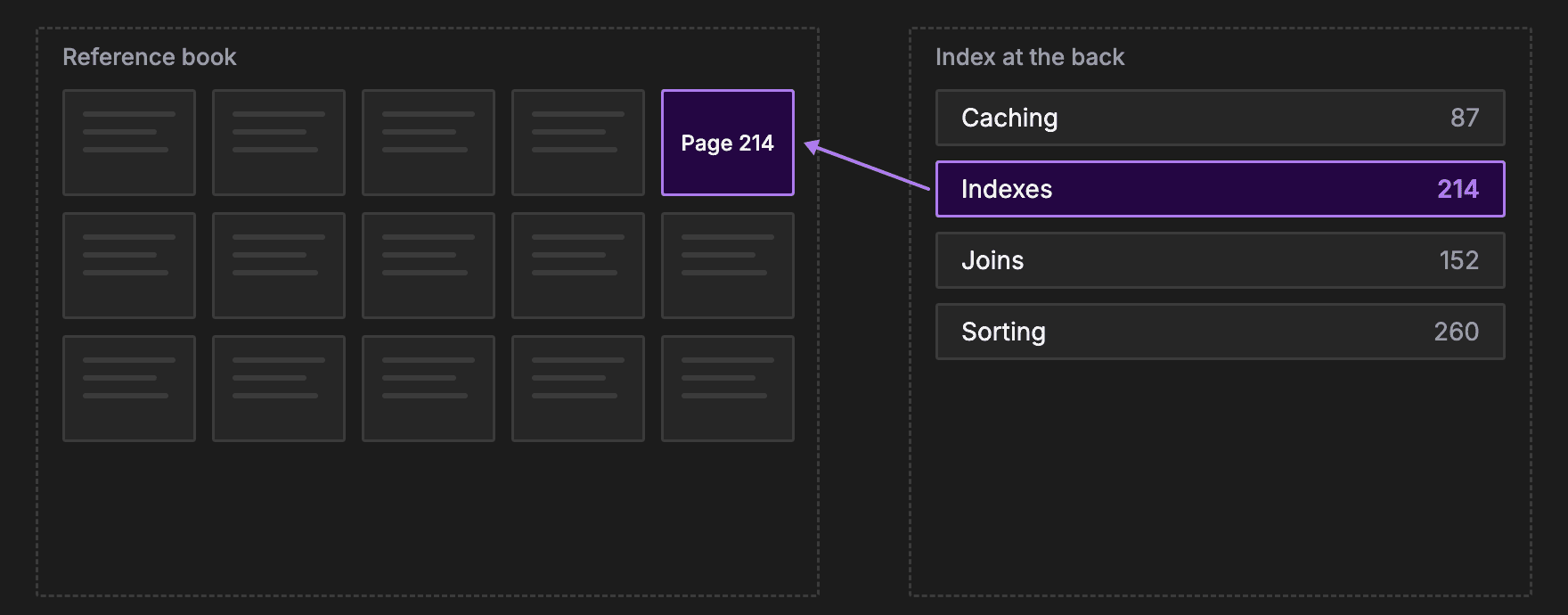
Full Scan vs Index Lookup
In a full table scan, the database reads row one, then row two, then row three, all the way to the end. If a table has a million rows, finding the last record requires a million individual checks. The time it takes grows linearly with the amount of data.In an index lookup, the database searches the sorted index instead and jumps straight to the matching row. Even with millions of rows, that takes just a few steps.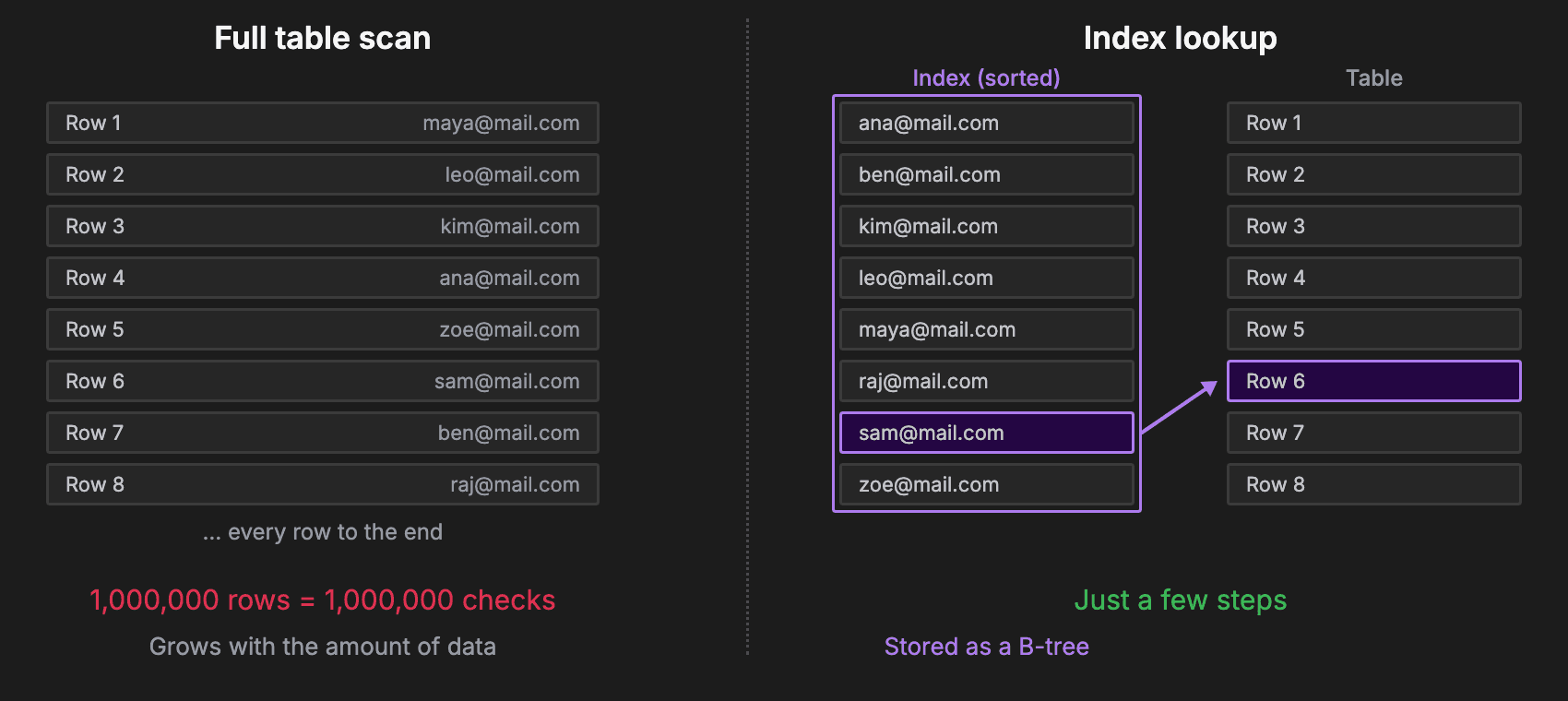
How a B-Tree Lookup Works
A B-tree is a type of balanced tree, where each node holds many sorted values and can branch to many children, not just two.In a database, each node is a page of the index. The top page, called the root, holds a few values that split the whole range.Say you are looking up a user by email. The root might send every email from A to M down one branch and N to Z down another, so the database follows just one branch.Each page below narrows the range again, until the database reaches a leaf page. The leaf holds the value and the pointer to the row.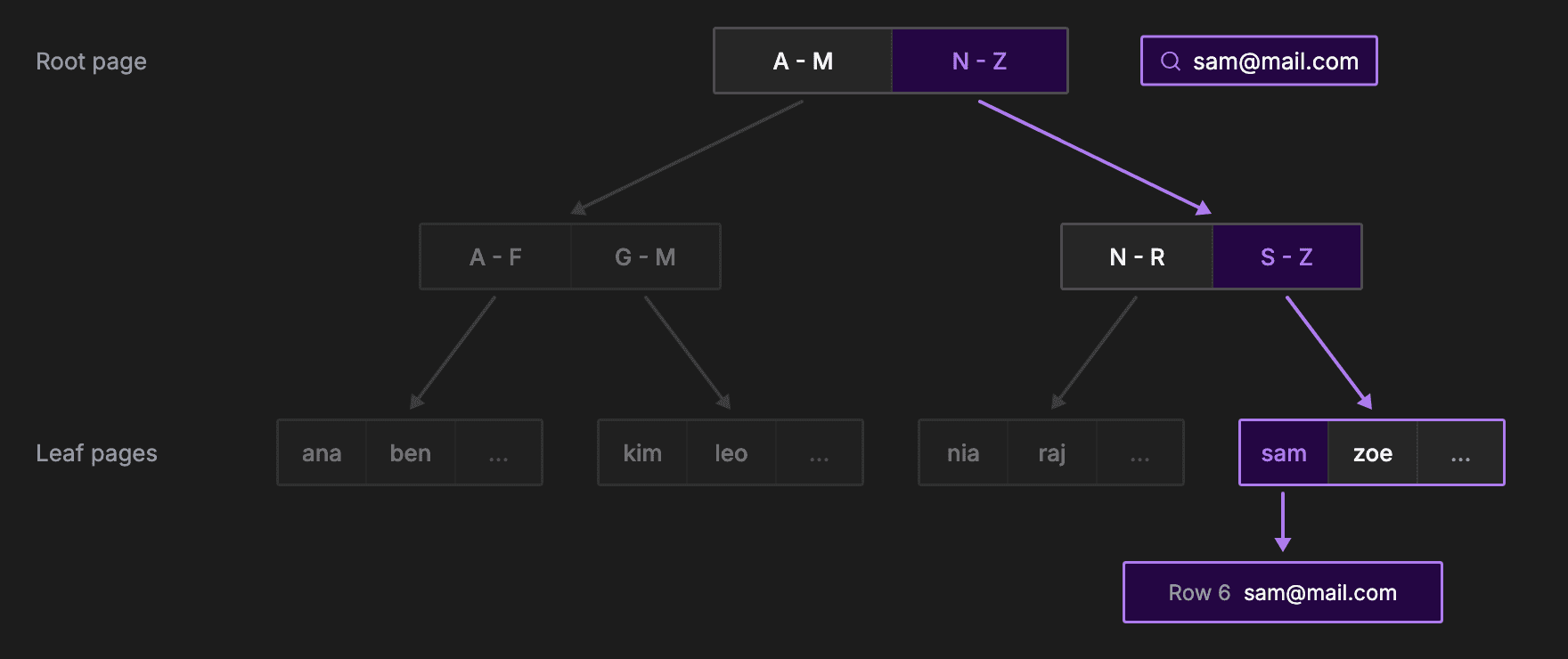
Types of Indexes
The three most common types of index are all built as B-trees:- Clustered index: the table is stored in index order. It is commonly the primary key, such as looking up an order by its order ID. It is used because the index leads straight to the row itself, with no extra jump.
- Non-clustered index: a separate structure that points back to the actual data rows. It is commonly used for lookups on other columns, such as finding a user by email. It is used because a table can only be stored in one order, so other columns need their own index.
- Composite index: an index on multiple columns combined, where the column order matters. It is commonly used for filters on several columns, such as one customer's orders from last month. It is sorted by customer and then by date, so one lookup narrows both at once.
Advantages
Using the right index gives your database several major benefits:- It drastically accelerates SELECT and WHERE operations.
- It speeds up JOIN conditions between large tables, because each row can find its match in the other table through the index, instead of scanning that whole table.
- It makes sorting data with ORDER BY much faster, because the index is already in sorted order, so there is nothing left to sort.
Disadvantages
However, indexes are not free and come with trade-offs:- They consume extra disk space, because you are duplicating column data.
- They cause slower write operations. Every INSERT, UPDATE and DELETE also has to update the index.
Choosing the Right Index
So how do you choose the right index? Here are some best practices:- Index the columns you filter, join and sort on most often.
- Prefer columns with many different values, like email. If you index a true or false status column, the database will often ignore the index and do a full scan anyway.
- In a composite index, put the column you always filter on first.
- Keep indexes to a minimum on write-heavy tables, because every index slows down every write. Each insert has to update the table and every one of its indexes, so a table with five indexes does six writes instead of one.
- Use EXPLAIN to check that your queries actually use the index, and drop indexes that nothing uses.
Recap
A full table scan checks every row, which is incredibly slow for large datasets. A database index solves this by providing a sorted shortcut to the data, usually stored as a B-tree that skips huge chunks of the table with every step.That speed comes with a write overhead, because the index must be updated every time the data changes. So index the columns you query most, and use EXPLAIN to check that it works.| Concept | Summary |
|---|---|
| Full table scan | Scanning every row one by one |
| Database index | A sorted copy of columns with pointers to rows |
| B-tree | A tree structure that drastically reduces lookup steps |
| Types of indexes | Clustered, non-clustered and composite |
| Write overhead | The cost of updating the index during data changes |
| Choosing an index | Index the columns you query most, then check with EXPLAIN |
About TechPrep
Never walk into a technical interview unprepared again. TechPrep empowers software engineers to stop guessing and start getting offers. We provide the exact questions asked by tech companies across Data Structures & Algorithms, System Design, Low-Level Design & Practical coding rounds. Don't leave your career up to chance. Join thousands of engineers who have successfully navigated the tech hiring maze and landed roles at top tech companies.